コマンドラインインターフェースの紹介
ノードオペレーターとして、CLIはRocket Poolと対話するための主要なツールです。
新しいminipoolの作成、すべてのステータスの確認、定期的なRPL報酬の請求、準備ができたらminipoolからの退出と引き出し、その他多くのアクティビティに使用します。
ExecutionチェーンとBeacon chainの同期が完了すると、すべてのコマンドが使用可能になります。
このセクションでは、より一般的なコマンドのいくつかと、CLIができる他のトリックについて簡単に説明します。
コマンドについて学ぶ
利用可能なすべてのコマンドをリストするには、次のように入力します:
出力は次のようになります:
______           _        _    ______           _
| ___ \         | |      | |   | ___ \         | |
| |_/ /___   ___| | _____| |_  | |_/ /__   ___ | |
|    // _ \ / __| |/ / _ \ __| |  __/ _ \ / _ \| |
| |\ \ (_) | (__|   <  __/ |_  | | | (_) | (_) | |
\_| \_\___/ \___|_|\_\___|\__| \_|  \___/ \___/|_|

Authored by the Rocket Pool Core Team
A special thanks to the Rocket Pool community for all their contributions.

NAME:
   rocketpool - Rocket Pool CLI

USAGE:
   rocketpoolcli [global options] command [command options] [arguments...]

VERSION:
   1.19.1

COMMANDS:
   auction, a   Manage Rocket Pool RPL auctions
   claims, l    View and claim all available rewards and credits across the node
   minipool, m  Manage the node's minipools
   megapool, g  Manage the node's megapool
   network, e   Manage Rocket Pool network parameters
   node, n      Manage the node
   odao, o      Manage the Rocket Pool oracle DAO
   pdao, p      Manage the Rocket Pool Protocol DAO
   queue, q     Manage the Rocket Pool deposit queue
   security, c  Manage the Rocket Pool security council
   service, s   Manage Rocket Pool service
   wallet, w    Manage the node wallet
   help, h      Shows a list of commands or help for one command

GLOBAL OPTIONS:
   --allow-root, -r              Allow rocketpool to be run as the root user
   --config-path path, -c path   Rocket Pool config asset path (default: "~/.rocketpool")
   --daemon-path path, -d path   Interact with a Rocket Pool service daemon at a path on the host OS, running outside of docker
   --maxFee value, -f value      The max fee (including the priority fee) you want a transaction to cost, in gwei (default: 0)
   --maxPrioFee value, -i value  The max priority fee you want a transaction to use, in gwei (default: 0)
   --gasLimit value, -l value    [DEPRECATED] Desired gas limit (default: 0)
   --nonce value                 Use this flag to explicitly specify the nonce that this transaction should use, so it can override an existing 'stuck' transaction
   --debug                       Enable debug printing of API commands
   --secure-session, -s          Some commands may print sensitive information to your terminal. Use this flag when nobody can see your screen to allow sensitive data to be printed without prompting
   --help, -h                    show help
   --version, -v                 print the version

COPYRIGHT:
   (c) 2026 Rocket Pool Pty Ltd
Serviceコマンド
serviceグループは、smart nodeが管理するさまざまなサービスを管理します。
rocketpool service helpの出力は次のようになります:
NAME:
   rocketpool service - Manage Rocket Pool service

USAGE:
   rocketpool service [global options] command [command options] [arguments...]

VERSION:
   1.19.1

COMMANDS:
   install, i                 Install the Rocket Pool service
   config, c                  Configure the Rocket Pool service
   status, u                  View the Rocket Pool service status
   start, s                   Start the Rocket Pool service
   pause, p                   Pause the Rocket Pool service
   stop, o                    Pause the Rocket Pool service (alias of 'rocketpool service pause')
   reset-docker, rd           Cleanup Docker resources, including stopped containers, unused images and networks. Stops and restarts Smart Node.
   prune-docker, pd           Cleanup unused Docker resources, including stopped containers, unused images, networks and volumes. Does not restart smartnode, so the running containers and the images and networks they reference will not be pruned.
   logs, l                    View the Rocket Pool service logs
   stats, a                   (DEPRECATED) No longer supported. Use 'docker stats -a' instead
   compose                    View the Rocket Pool service docker compose config
   version, v                 View the Rocket Pool service version information
   prune-eth1, n              Shuts down the main ETH1 client and prunes its database, freeing up disk space, then restarts it when it's done.
   install-update-tracker, d  Install the update tracker that provides the available system update count to the metrics dashboard
   get-config-yaml            Generate YAML that shows the current configuration schema, including all of the parameters and their descriptions
   resync-eth1                Deletes the main ETH1 client's chain data and resyncs it from scratch. Only use this as a last resort!
   resync-eth2                Deletes the ETH2 client's chain data and resyncs it from scratch. Only use this as a last resort!
   terminate, t               Deletes all of the Rocket Pool Docker containers and volumes, including your ETH1 and ETH2 chain data and your Prometheus database (if metrics are enabled). Also removes your entire `.rocketpool` configuration folder, including your wallet, password, and validator keys. Only use this if you are cleaning up the Smart Node and want to start over!

GLOBAL OPTIONS:
   --compose-file value, -f value  Optional compose files to override the standard Rocket Pool docker compose YAML files; this flag may be defined multiple times
   --help, -h                      show help
status
このコマンドは、Rocket Poolが管理する各Dockerコンテナの現在の実行ステータスを表示します。
例えば、デフォルトのDockerインストールの出力は次のようになります:
        Name                       Command              State                                                       Ports
------------------------------------------------------------------------------------------------------------------------------------------------------------------------------
rocketpool_api          /bin/sleep infinity             Up
rocketpool_eth1         sh /setup/start-node.sh         Up      0.0.0.0:30303->30303/tcp,:::30303->30303/tcp, 0.0.0.0:30303->30303/udp,:::30303->30303/udp, 8545/tcp, 8546/tcp
rocketpool_eth2         sh /setup/start-beacon.sh       Up      0.0.0.0:9001->9001/tcp,:::9001->9001/tcp, 0.0.0.0:9001->9001/udp,:::9001->9001/udp
rocketpool_node         /go/bin/rocketpool node         Up
rocketpool_validator    sh /setup/start-validator.sh    Up
rocketpool_watchtower   /go/bin/rocketpool watchtower   Up
これを使用して、Dockerコンテナに問題がないか迅速に確認したり、startまたはstopコマンドが正しく機能したことを確認したりできます。
startとstop
これら2つのコマンドは既にご存知でしょう。
単にすべてのRocket Poolコンテナを起動または停止します。
Tip
pauseコマンドはstopと同じことを行います。
これはRocket Poolの初期バージョンからのレガシーコマンドとして残っているだけです。
logs
このコマンドも既に見たことがあるはずです。
各Dockerコンテナの出力ログを確認するために使用できます。
これはトラブルシューティングや、より詳細なステータスレポートを取得するのに役立ちます。
他の引数なしで単にrocketpool service logsを実行すると、すべてのログが一度に集約されて表示されます。
1つのコンテナの出力に焦点を当てたい場合は、コンテナを指定する引数を最後に追加できます。
有効な値はeth1、eth2、validator、api、node、watchtower、prometheus、grafana、およびnode-exporterです。
stats
このコマンドは、各コンテナからのリソース統計を表示し、それぞれのハードウェアとネットワークの消費をプロファイルするために使用できます。
システムの動作が遅くなったり、RAMの問題がある場合、コンテナを監視するのに役立つかもしれません。
以下は出力例です:
CONTAINER ID   NAME                    CPU %     MEM USAGE / LIMIT     MEM %     NET I/O           BLOCK I/O         PIDS
62314e5a0ecf   rocketpool_api          0.00%     18.89MiB / 62.78GiB   0.03%     50.6kB / 31.1kB   57.4MB / 0B       1
ac629c08c896   rocketpool_eth1         5.44%     18.13GiB / 62.78GiB   28.88%    1.63GB / 1.66GB   24.4GB / 37.7GB   27
4dfc7a2e939b   rocketpool_eth2         97.39%    2.369GiB / 62.78GiB   3.77%     1.79GB / 45MB     333MB / 24.1GB    2
a3c22f54eff0   rocketpool_node         0.00%     12.13MiB / 62.78GiB   0.02%     308kB / 504kB     0B / 0B           15
0d5818868ef6   rocketpool_validator    0.00%     936KiB / 62.78GiB     0.00%     12.1kB / 0B       4.57MB / 0B       2
88bea525fa89   rocketpool_watchtower   0.00%     12.05MiB / 62.78GiB   0.02%     304kB / 503kB     0B / 0B           16
注意
ここのRAM統計は、仮想メモリを含む総割り当てメモリを示しています。
生のレジデントメモリ消費は示していません。
同様に、CPU使用率は、コンテナが使用するすべてのCPUコアにわたって平均化されたCPU消費の合計量を示しています。
ここでは、ETH2のCPUがほぼ100%と表示されていますが、これはNimbusを使用しており、シングルスレッドであるためです。
実際のリソース消費については、htopやbtopのようなプログラムの方がより良い洞察を提供する場合があります。
config
このコマンドは、設定インタビューを再度実行します。
ExecutionまたはConsensus clientの選択を変更したり、最初に指定したパラメータ(validatorのグラフィティメッセージ、接続する最大ピア数など)の一部を変更したい場合に使用できます。
このコマンドはいつでも呼び出せますが、変更はrocketpool service stopとrocketpool service startを呼び出すまで有効になりません。
terminate
このコマンドは、Dockerコンテナをシャットダウンし、それらを削除し、Rocket Pool仮想ネットワークを削除し、ETH1とETH2のチェーンデータボリュームを削除します。
基本的に、DockerセットアップからすべてのRocket Poolアイテムを削除します。
Rocket Poolインストールのその部分をクリーンアップしたいときに使用します。
Warning
これにより、チェーンデータが不可逆的に削除されます。つまり、ETH1とETH2を再度同期する必要があります。
これは、ウォレットとパスワードファイル、設定、またはvalidatorキーを削除しません。
これらを削除するには、DockerまたはHybrid Modeでは~/.rocketpool/dataフォルダーを、Native Modeでは対応するディレクトリを削除する必要があります。
Nodeコマンド
nodeグループには、Rocket Poolノードの操作が含まれます。
次のセクションでminipoolを作成する際に、これらについてより詳しく説明しますが、一目で確認するのに役立つかもしれません。
rocketpool node helpの出力は次のようになります:
NAME:
   rocketpool node - Manage the node

USAGE:
   rocketpool node command [command options] [arguments...]

COMMANDS:
   status, s                                     Get the node's status
   sync, y                                       Get the sync progress of the eth1 and eth2 clients
   register, r                                   Register the node with Rocket Pool
   rewards, e                                    Get the time and your expected RPL rewards of the next checkpoint
   set-primary-withdrawal-address, w             Set the node's primary withdrawal address, which will receive all ETH rewards (and RPL if the RPL withdrawal address is not set)
   confirm-primary-withdrawal-address, f         Confirm the node's pending primary withdrawal address if it has been set back to the node's address itself
   set-rpl-withdrawal-address, srwa              Set the node's RPL withdrawal address, which will receive all RPL rewards and staked RPL withdrawals
   confirm-rpl-withdrawal-address, crwa          Confirm the node's pending rpl withdrawal address if it has been set back to the node's address itself
   allow-rpl-locking, arl                        Allow the node to lock RPL when creating governance proposals/challenges
   deny-rpl-locking, drl                         Do not allow the node to lock RPL when creating governance proposals/challenges
   set-timezone, t                               Set the node's timezone location
   swap-rpl, p                                   Swap old RPL for new RPL
   stake-rpl, k                                  Stake RPL against the node
   add-address-to-stake-rpl-whitelist, asw       Adds an address to your node's RPL staking whitelist, so it can stake RPL on behalf of your node.
   remove-address-from-stake-rpl-whitelist, rsw  Removes an address from your node's RPL staking whitelist, so it can no longer stake RPL on behalf of your node.
   claim-rewards, c                              Claim available RPL and ETH rewards for any checkpoint you haven't claimed yet
   withdraw-rpl, i                               Withdraw RPL staked against the node
   withdraw-eth, h                               Withdraw ETH staked on behalf of the node
   withdraw-credit, wc                           (Saturn) Withdraw ETH credit from the node as rETH
   deposit, d                                    Make a deposit and create a minipool
   create-vacant-minipool, cvm                   Create an empty minipool, which can be used to migrate an existing solo staking validator as part of the 0x00 to 0x01 withdrawal credentials upgrade
   send, n                                       Send ETH or tokens from the node account to an address. ENS names supported. Use 'all' as the amount to send the entire balance. <token> can be 'rpl', 'eth', 'fsrpl' (for the old RPL v1 token), 'reth', or the address of an arbitrary token you want to send (including the 0x prefix).
   set-voting-delegate, sv                       (DEPRECATED) Use `rocketpool pdao set-signalling-address` instead
   clear-voting-delegate, cv                     (DEPRECATED) Use `rocketpool pdao clear-signalling-address` instead
   initialize-fee-distributor, z                 Create the fee distributor contract for your node, so you can withdraw priority fees and MEV rewards after the merge
   distribute-fees, b                            Distribute the priority fee and MEV rewards from your fee distributor to your withdrawal address and the rETH contract (based on your node's average commission)
   join-smoothing-pool, js                       Opt your node into the Smoothing Pool
   leave-smoothing-pool, ls                      Leave the Smoothing Pool
   sign-message, sm                              Sign an arbitrary message with the node's private key
   send-message                                  Send a zero-ETH transaction to the target address (or ENS) with the provided hex-encoded message as the data payload
   claim-unclaimed-rewards, cur                  Sends any unclaimed rewards to the node's withdrawal address
   provision-express-tickets, pet                Provision the node's express tickets

OPTIONS:
   --help, -h  show help
以下は、通常のノード運用中に必要になる可能性のあるコマンドのいくつかの概要です。
status
このコマンドは、ノード全体の概要を一目で提供します。
ステーキングしているETHとRPLの量、所有しているminipoolの数とそのステータス、RPL担保比率などが含まれます。
これは、ノードを登録していくつかのminipoolをセットアップした後のrocketpool node statusの表示例です:
=== Account and Balances ===
The node 0x4d19DE4A5a1B1B36EBaB3D5c32C01061fbDE328d has a balance of 49.402553 ETH and 0.000000 RPL.
The node has 0.000000 ETH in its credit balance and 0.000000 ETH staked on its behalf. 0.000000 can be used to make new validators.
The node is registered with Rocket Pool with a timezone location of America/Los_Angeles.

=== Megapool ===
The node has a megapool deployed at 0xCf3576c5A6e5a25AC00C9adb6751924BAe1680B1.
The megapool has 9 validators.
The node has 0 express queue ticket(s).

=== Penalty Status ===
The node does not have any penalties for cheating with an invalid fee recipient.

=== Signalling on Snapshot ===
The node does not currently have a snapshot signalling address set.
To learn more about snapshot signalling, please visit https://docs.rocketpool.net/pdao/participate#setting-your-snapshot-signalling-address.
Rocket Pool has no Snapshot governance proposals being voted on.

=== Onchain Voting ===
The node doesn't have a delegate, which means it can vote directly on onchain proposals. You can have another node represent you by running `rocketpool p svd <address>`.
The node is NOT allowed to lock RPL to create governance proposals/challenges.

=== Primary Withdrawal Address ===
The node's primary withdrawal address has not been changed, so ETH rewards and minipool withdrawals will be sent to the node itself.
Consider changing this to a cold wallet address that you control using the `set-withdrawal-address` command.

=== RPL Withdrawal Address ===
The node's RPL withdrawal address has not been set. All RPL rewards will be sent to the primary withdrawal address.

=== Fee Distributor and Smoothing Pool ===
The node's fee distributor 0x84c1f488CDecb2E335c40901E3Fe58925f4cC9A7 has a balance of 0.004897 ETH.
NOTE: You are in Native Mode; you MUST ensure that your Validator Client is using this address as its fee recipient!
The node is not opted into the Smoothing Pool.
To learn more about the Smoothing Pool, please visit https://docs.rocketpool.net/upgrades/redstone/whats-new#smoothing-pool.
You have 3 minipools that would earn extra commission if you opted into the smoothing pool!
See https://rpips.rocketpool.net/RPIPs/RPIP-62 for more information about bonus commission, or run `rocketpool node join-smoothing-pool` to opt in.

=== RPL Stake ===
NOTE: The following figures take *any pending bond reductions* into account.

The node has a total stake of 20000.000000 RPL.
This is currently 3.74% of its borrowed ETH and 30.06% of its bonded ETH.
The node has 0.000000 megapool staked RPL.
The node has 20000.000000 legacy staked RPL.
The node has a total stake (legacy minipool RPL plus megapool RPL) of 20000.000000 RPL.
You have 0.000000 RPL staked on your megapool and can request to unstake up to 0.000000 RPL

=== Minipools ===
The node has a total of 3 active minipool(s):
- 3 staking
sync
このコマンドは、ExecutionクライアントとConsensusクライアントの現在の同期ステータスを表示します。
ノードを最初にセットアップするときはよく使用しますが、その後は(クライアントを変更またはリセットしない限り)必要ありません。
rocketpool node syncの出力は次のようになります:
Your Smartnode is currently using the Hoodi Test Network.

Your eth1 client hasn't synced enough to determine if your eth1 and eth2 clients are on the same network.
To run this safety check, try again later when eth1 has made more sync progress.

Your primary execution client is still syncing (67.12%).
You do not have a fallback execution client enabled.
Your primary consensus client is still syncing (99.94%).
You do not have a fallback consensus client enabled.
Prysmは現在完了パーセンテージを提供していないことに注意してください。使用している場合は、eth2ログを確認する必要があります。
stake-rpl
このコマンドは、ノードにRPL担保を追加したいときに使用します。
これにより、担保比率が上昇し、各チェックポイントでのRPL報酬が増加します(これについては後で詳しく説明します)。
これまでの他のコマンドとは異なり、このコマンドはトランザクションをトリガーするため、実際にインタラクティブです。単なる情報提供ではありません。
まず、ステーキングしたいRPLの量を尋ねられます。便利な事前定義オプションまたはカスタム量を指定する機能があります:
NOTE: By staking RPL, you become a member of the Rocket Pool pDAO. Stay informed on governance proposals by joining the Rocket Pool Discord.

Please choose an amount of RPL to stake:
1: 5% of borrowed ETH (733.993926 RPL) for one validator?
2: 10% of borrowed ETH (1467.987852 RPL) for one validator?
3: 15% of borrowed ETH (2201.981778 RPL) for one validator?
4: Your entire RPL balance (20000.000000 RPL)?
5: A custom amount
オプションを選択すると、推奨されるガス価格と使用される推定量に関する情報と、確認ダイアログが表示されます。ノードでRPLをステーキングするのが初めての場合は、ステーキングコントラクトにRPLと相互作用する承認を与える必要があります:
Before staking RPL, you must first give the staking contract approval to interact with your RPL.
This only needs to be done once for your node.
+============== Suggested Gas Prices ==============+
| Avg Wait Time |  Max Fee  |    Total Gas Cost    |
| 15 Seconds    | 4 gwei    | 0.0001 to 0.0001 ETH |
| 1 Minute      | 4 gwei    | 0.0001 to 0.0001 ETH |
| 3 Minutes     | 4 gwei    | 0.0001 to 0.0001 ETH |
| >10 Minutes   | 4 gwei    | 0.0001 to 0.0001 ETH |
+==================================================+

These prices include a maximum priority fee of 2.00 gwei.
Please enter your max fee (including the priority fee) or leave blank for the default of 4 gwei:

Using a max fee of 4.00 gwei and a priority fee of 2.00 gwei.
Do you want to let the staking contract interact with your RPL? [y/n]
y

Approving RPL for staking...
Transaction has been submitted with hash <transaction hash>.
You may follow its progress by visiting:
https://hoodi.etherscan.io/tx/<transaction hash>

Waiting for the transaction to be included in a block... you may wait here for it, or press CTRL+C to exit and return to the terminal.

Successfully approved staking access to RPL.
RPL Stake Gas Info:
+============== Suggested Gas Prices ==============+
| Avg Wait Time |  Max Fee  |    Total Gas Cost    |
| 15 Seconds    | 4 gwei    | 0.0005 to 0.0007 ETH |
| 1 Minute      | 4 gwei    | 0.0005 to 0.0007 ETH |
| 3 Minutes     | 4 gwei    | 0.0005 to 0.0007 ETH |
| >10 Minutes   | 4 gwei    | 0.0005 to 0.0007 ETH |
+==================================================+

These prices include a maximum priority fee of 2.00 gwei.
Please enter your max fee (including the priority fee) or leave blank for the default of 4 gwei:

Using a max fee of 4.00 gwei and a priority fee of 2.00 gwei.
Are you sure you want to stake 733.993925 RPL? You will not be able to unstake this RPL until you exit your validators and close your minipools, or reach 2201.981777 staked RPL (15% of bonded eth)! [y/n]
確認すると、トランザクションハッシュが表示され、進行状況を追跡できるEtherscanへのリンクが提供されます:
Staking RPL...
Transaction has been submitted with hash <transaction hash>.
You may follow its progress by visiting:
https://hoodi.etherscan.io/tx/<transaction hash>

Waiting for the transaction to be included in a block... you may wait here for it, or press CTRL+C to exit and return to the terminal.

Successfully staked 733.993925 RPL.
ほとんどの操作は1つのトランザクションのみを必要とするため、CLIはブロックに含まれるまで待機してから終了します。ただし、stake-rplは2つのトランザクションを必要とする数少ないコマンドの1つであるため、このダイアログは2回表示されます。
claim-rewards
ノードが新しい報酬チェックポイントを検出すると、その間隔の情報を含む報酬ツリーファイルを自動的にダウンロードします(デフォルトのDownload Modeを使用している場合。ダウンロードする代わりに独自のツリーを生成する方法については、以下を参照してください)。
次のコマンドを使用して報酬を確認できます:
rocketpool node claim-rewards
間隔が経過して報酬が蓄積されると、出力は次のようになります:
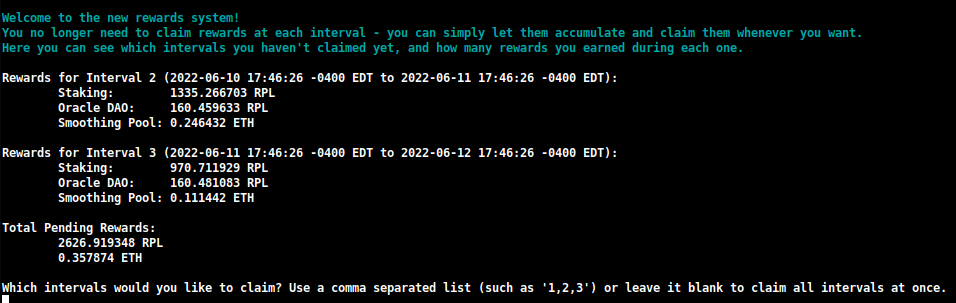
ここで、各間隔で獲得した報酬の数を迅速に確認し、請求したいものを決定できます。
この請求中に再ステーキングしたい量を指定することもできます:

これにより、1つのトランザクションでRPL報酬を複利運用でき、レガシー請求システムで使用する必要があったガスよりも大幅に少ないガスで済みます。
注意
Oracle DAOによって作成されたものをダウンロードする代わりに、報酬チェックポイントを手動で構築したい場合は、TUIでこの設定をDownloadからGenerateに変更できます:
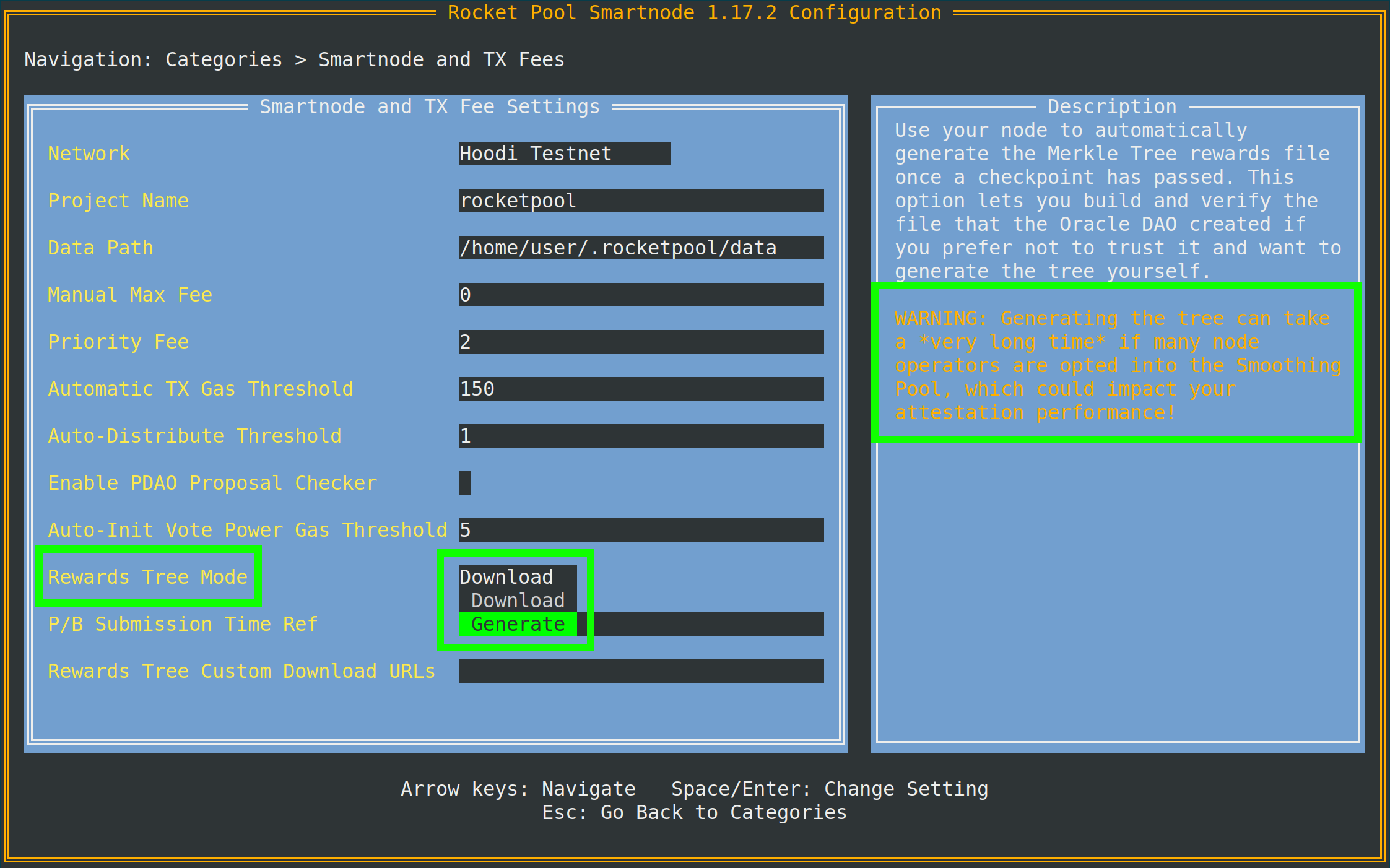
ヒントが示すように、これを行うにはExecution clientアーカイブノードへのアクセスが必要です。
ローカルのExecution clientがアーカイブノードでない場合は、同じメニューの下部にあるArchive-Mode EC URLで別のもの(InfuraやAlchemyなど)を指定できます。
このURLは、Merkleツリーを生成するときにのみ使用されます。検証業務には使用されません。
join-smoothing-pool
rocketpool node join-smoothing-pool
これにより、Rocket Poolコントラクトでオプトインとして記録され、Validator Clientのfee recipientがノードのディストリビューターコントラクトからSmoothing Poolコントラクトに自動的に変更されます。
オプトインすると、オプトアウトできるようになるまで28日間のクールダウン(報酬間隔の1つ分の長さ)があることに注意してください。
leave-smoothing-pool
rocketpool node leave-smoothing-pool
これにより、現在オプトインしていて、オプトインしてから少なくとも28日間待った場合、Smoothing Poolからオプトアウトされます。
現在のエポックの次のエポックがファイナライズされると、ノードのfee recipientがSmoothing Poolからノードのディストリビューターコントラクトに自動的に変更されます。
これは、提案が来ることがわかったときに退出プロセスをフロントランニングしてペナルティを受けないようにするためです。
distribute-fees
fee distributorで報酬を獲得したら、次のコマンドを使用して残高全体を請求および分配できます:
rocketpool node distribute-fees
これにより、報酬のシェアがwithdrawal addressに送信されます。
send
このコマンドを使用すると、ノードウォレットから別のアドレスにETH、RPL、またはその他のRocket Pool関連トークンを送信できます。
ウォレットの資金を他の場所に移動したい場合に役立つかもしれません。
sendコマンドを使用する構文は次のとおりです:
rocketpool node send <amount> <token> <address or ENS name>
引数は次のとおりです:
<amount>は送信するトークンの量です。<token>は送信するトークンです。これはeth、rpl、fsrpl(古いレガシーRPLトークン)、またはrethです。<address or ENS name>はトークンを送信するEthereumアドレス(またはENS名)です。
例えば:
rocketpool node send 1 eth <my friend's address>
は友人に1 ETHを送信します。
Megapoolコマンド
megapoolグループは、megapoolおよびmegapool validatorを管理するために使用するすべてのコマンドにアクセスできる場所です。
rocketpool megapool helpの出力は次のようになります:
NAME:
   rocketpool megapool - Manage the node's megapool

USAGE:
   rocketpool megapool [global options] command [command options] [arguments...]

VERSION:
   1.19.1

COMMANDS:
   deposit, d                Make a deposit and create a new validator on the megapool. Optionally specify count to make multiple deposits.
   status, s                 Get the node's megapool status
   validators, v             Get a list of the megapool's validators
   repay-debt, r             Repay megapool debt
   reduce-bond, e            Reduce the megapool bond
   claim, c                  Claim any megapool rewards that were distributed but not yet claimed
   stake, k                  Stake a megapool validator
   exit-queue, x             Exit the megapool queue
   dissolve-validator, i     Dissolve a megapool validator
   exit-validator, t         Request to exit a megapool validator
   notify-validator-exit, n  Notify that a validator exit is in progress
   notify-final-balance, f   Notify that a validator exit has completed and the final balance has been withdrawn
   distribute, b             Distribute any accrued execution layer rewards sent to this megapool

GLOBAL OPTIONS:
   --help, -h  show help
以下は、通常の運用中に使用するコマンドの概要です:
deposit
このコマンドを使用すると、megapool上に新しいvalidatorを作成できます。後でさらに詳しく説明します。プレビューを見たい場合はMegapool Validatorの作成に進んでください。
status
このコマンドは、megapoolの状態とmegapoolが管理するvalidatorに関する情報を提供します。megapoolのアドレス、express queueチケット数、megapoolのデリゲートアドレス、ExecutionレイヤーとConsensusレイヤーのETH残高、その他多くの有用な情報を確認できます。以下はrocketpool megapool statusの出力例です:
=== Megapool ===
The node has a megapool deployed at 0xCf3576c5A6e5a25AC00C9adb6751924BAe1680B1
The node has 0 express ticket(s).
The megapool has 9 validators.

=== Megapool Delegate ===
The megapool is using the latest delegate.
The megapool's effective delegate address is 0x138602A95956995280f1146aA9477d6B4E481B3c
The megapool has automatic delegate upgrades disabled. You can toggle this setting using 'rocketpool megapool set-use-latest-delegate'.

=== Megapool Balance ===
The megapool has 4.000000 node bonded ETH.
The megapool has 28.000000 RP ETH for a total of 32.000000 bonded ETH.
Megapool balance (EL): 32.051883 ETH
The megapool has 1 validators exiting. You'll be able to see claimable rewards once the exit process is completed.
Beacon balance (CL): 0.000000 ETH
Your portion: 0.000000 ETH
Current network commission: 5.000000%
validators
rocketpool megapool validatorsコマンドは、ノードのmegapoolが管理するすべてのvalidatorのステータスを表示します。validatorの公開鍵、Beacon Chainの状態、プレステーキングvalidatorのキュー位置などの情報を確認できます:
There are 8 validator(s) on the express queue.
There are 2 validator(s) on the standard queue.
The express queue rate is 2.

1 Staking validator(s):

Megapool Validator ID:        1
Validator pubkey:             <pubkey>
Validator active:             no
Validator index:              <index>
Beacon status:                pending_queued
Express Ticket Used:          no


1 Initialized validator(s):

--------------------

Megapool Validator ID:        2
Expected pubkey:              <pubkey>
Validator active:             no
Validator Queue Position:     10
Express Ticket Used:          no


1 Exiting validator(s):

--------------------

Megapool Validator ID:        0
Validator pubkey:             <pubkey>
Validator active:             no
Validator index:              <index>
Beacon status:                withdrawal_done
Express Ticket Used:          yes
exit-validator
このコマンドを使用すると、Beacon Chain上で自発的に退出するvalidatorを選択できます。validatorを閉じて最終的なETH残高を引き出したいときに使用します。これは元に戻せないことに注意してください。退出をトリガーすると、validatorは永続的にシャットダウンします。
Minipoolコマンド
minipoolグループには、minipoolに影響を与えるコマンドが含まれます。
nodeグループと同様に、次のセクションでこれらについてより詳しく説明しますが、今すぐすべてを確認するのに役立つかもしれません。
rocketpool minipool helpの出力は次のようになります:
NAME:
   rocketpool minipool - Manage the node's minipools

USAGE:
   rocketpool minipool command [command options] [arguments...]

COMMANDS:
   status, s                  Get a list of the node's minipools
   stake, t                   Stake a minipool after the scrub check, moving it from prelaunch to staking.
   set-withdrawal-creds, swc  Convert the withdrawal credentials for a migrated solo validator from the old 0x00 value to the minipool address. Required to complete the migration process.
   import-key, ik             Import the externally-derived key for a minipool that was previously a solo validator, so the Smart Node's VC manages it instead of your externally-managed VC.
   promote, p                 Promote a vacant minipool after the scrub check, completing a solo validator migration.
   refund, r                  Refund ETH belonging to the node from minipools
   begin-bond-reduction, bbr  Begins the ETH bond reduction process for a minipool, taking it from 16 ETH down to 8 ETH (begins conversion of a 16 ETH minipool to an LEB8)
   reduce-bond, rb            Manually completes the ETH bond reduction process for a minipool from 16 ETH down to 8 ETH once it is eligible. Please run `begin-bond-reduction` first to start this process.
   distribute-balance, d      Distribute a minipool's ETH balance between your withdrawal address and the rETH holders.
   exit, e                    Exit staking minipools from the beacon chain
   close, c                   Withdraw any remaining balance from a minipool and close it
   delegate-upgrade, u        Upgrade a minipool's delegate contract to the latest version
   find-vanity-address, v     Search for a custom vanity minipool address
   rescue-dissolved, rd       Manually deposit ETH into the Beacon deposit contract for a dissolved minipool, activating it on the Beacon Chain so it can be exited.

OPTIONS:
   --help, -h  show help
以下は、通常使用するコマンドの概要です。
status
このコマンドは、各minipoolの概要を提供するだけです。
これには、現在のステータス、minipoolのeth1アドレス、それに対する手数料(node feeと呼ばれます)、対応するETH2バリデーターの公開鍵、およびその他いくつかの事項が含まれます:
$ rocketpool minipool status

1 Staking minipool(s):

--------------------

Address:                <minipool eth1 address>
Penalties:             0
Status updated:        2025-07-15, 08:31 +0000 UTC
Node fee:              5.000000%
Node deposit:          8.000000 ETH
RP ETH assigned:       2025-07-14, 20:26 +0000 UTC
RP deposit:            24.000000 ETH
Minipool Balance (EL): 0.064202 ETH
Your portion:          0.018458 ETH
Available refund:      0.000000 ETH
Total EL rewards:      0.018458 ETH
Validator pubkey:      <validator eth2 address>
Validator index:       <validator eth2 index>
Validator active:      yes
Beacon balance (CL):   32.000347 ETH
Your portion:          8.000099 ETH
Use latest delegate:   no
Delegate address:      0x56903694d881282D33ed0643EAe14263880Dd47F
Rollback delegate:     <none>
Effective delegate:    0x56903694d881282D33ed0643EAe14263880Dd47F
refund
このコマンドを使用すると、minipoolを作成するために32 ETHを入金した場合、Rocket PoolがrETHステーキングプールから16 ETHを貢献できた後、minipoolから16 ETHを引き出すことができます。
exit
このコマンドは、Beacon Chain上のvalidatorに対して自発的な退出を送信します。
validatorを閉じて最終的なETH残高を引き出したいときに使用します。
これは元に戻せません - 退出をトリガーすると、validatorは永続的にシャットダウンします。
便利なフラグ
上記のコマンドのいくつかに追加できる便利なグローバルフラグがあります。これらを活用することをお勧めします。
カスタム最大手数料または優先手数料(ガス価格)の設定
2021年7月のLondon ETH1ハードフォーク以降、Ethereumトランザクションはトランザクションに単一のガス価格を使用しなくなりました。
代わりに、最新のEthereumトランザクションは2つの値を使用します:
- max fee、トランザクションで受け入れる絶対最大ガス価格を記述します
- max priority fee、ブロックにトランザクションを含めるためにマイナーに「チップ」として支払う最大金額を記述します
ヒント
これら2つの値の動作は少し複雑になることがあるため、いくつかの簡単な例を示します。
現在のネットワーク手数料(base feeと呼ばれます)が50 gweiだとしましょう。
80 gweiのmax feeと2 gweiの優先手数料でトランザクションを送信します。
ネットワークのbase feeがmax feeよりも低いため、このトランザクションは現在のブロックに含まれる可能性があります。
base feeに50 gwei、優先手数料に2 gweiがかかります。max feeを80に設定しましたが、合計で52 gweiしかかかりません。
別の例として、同じトランザクションがあり、現在ネットワークのbase feeが100 gweiだとします。
100 gweiは80 gweiのmax feeよりも大きいため、トランザクションはこのブロックに含まれません。
代わりに、base feeが含まれるほど低くなるまで、トランザクションプールに単純に留まります。
次に、現在のbase feeが再び50 gweiで、トランザクションのmax feeが80 gwei、優先手数料が4 gweiだとしましょう。
合計コスト54 gweiで実行されます。
4 gweiの優先手数料により、優先手数料が低いすべてのトランザクションの前に含まれることが保証されます。
トランザクションを何としても通過させたい場合は、優先手数料をmax feeと同じに設定できます。
これにより、レガシーガスの動作がエミュレートされるため、トランザクションは与えられたガスをすべて使用します。ネットワークのbase feeがmax feeよりも低いかどうかに関係なく。
デフォルトでは、Rocket Poolはオラクルを使用して現在のトランザクションプールを確認し、トリガーするトランザクションに対して妥当なmax feeを提案します。
主要な提案オラクルとしてEtherChainを使用し、バックアップとしてEtherscanを使用します。
必要に応じて、-fフラグを使用して支払う意思のあるカスタムmax fee(gweiで)を設定できます。
-iフラグを使用してカスタム優先手数料を設定することもできます。
これを行うには、rocketpoolの後、他のコマンド情報の前にそれらを追加します。
例えば、このフラグを使用してnode set-timezoneを呼び出すと、次の出力が提供されます:
$ rocketpool -f 10 node set-timezone

Would you like to detect your timezone automatically? [y/n]
n

Please enter a timezone to register with in the format 'Country/City':
Australia/Brisbane

You have chosen to register with the timezone 'Australia/Brisbane', is this correct? [y/n]
y

Using the requested max fee of 10.00 gwei (including a max priority fee of 2.00 gwei).
Total cost: 0.0005 to 0.0007 ETH
Are you sure you want to set your timezone? [y/n]
これは、ネットワークが推奨するmax feeに関係なく、このトランザクションを送信するときに10 gweiのカスタムmax fee(および指定した場合は優先手数料)を代わりに使用することを示しています。
注意
手動でmax feeを設定する場合は、トランザクションを送信する前に、EtherChainなどのサードパーティのガス価格オラクルを使用して、その手数料が現在のネットワーク状況に対して十分高いかどうかを判断することを強くお勧めします。
スタックしたトランザクションのキャンセル/上書き
時々、ネットワークにトランザクションを送信したが、使用したガス価格がネットワーク状況に対してあまりにも低く、実行に非常に長い時間がかかるシナリオに遭遇する可能性があります。
その後のすべてのトランザクションがそのトランザクションが通過するまで待機するため、そのトランザクションは本質的にRocket Poolノードのすべての操作をブロックします。
この状況に対処するために、そのようなトランザクションを他のものと置き換えることで「キャンセル」できるグローバルフラグを追加しました。
ノードウォレットを含むすべてのEthereumウォレットは、トランザクションを順次送信します。
送信する各トランザクションには、シーケンス内のどこにあるかを識別するnonceと呼ばれる番号があります。
送信する最初のトランザクションはnonceが0になり、次に送信するトランザクションはnonceが1になります。
この上書き技術には、既存のスタックしたトランザクションと同じnonceを使用する新しいトランザクションを送信することが含まれますが、理想的にはスタックしたものよりも高いガス価格が含まれます。
これは、新しいものが最初にマイニングされることを意味します。
ブロックにマイニングされるとすぐに、古いものは最初から送信されなかったかのようにネットワークから破棄されます。
このフラグを使用するには、まずスタックしたトランザクションのnonceを見つける必要があります:
- https://etherscan.ioのようなETH1ブロックエクスプローラーに移動します。
- ウォレットのアドレスに移動し、トランザクションのリストを確認します。
- 最新のものから始めて、
Pending状態のリストの一番下にあるものが見つかるまで確認します。
- そのトランザクションの
nonceをマークします。それが必要なものです。
それを取得したら、--nonce <value> -i 2.2フラグをrocketpoolの後、コマンドの残りの前に使用して、CLIで任意のトランザクションを呼び出すだけです。
注意
以前のトランザクションを上書きするには、-i(優先手数料)フラグを含める必要があります。
この数値は、古いトランザクションが使用した優先手数料よりも少なくとも10%高い必要があります。
Smartnodeはデフォルトで2 gweiの優先手数料を使用するため、通常は2.2の値で十分です。
古いトランザクションがカスタム手数料(たとえば、10 gwei)を使用した場合、上書きトランザクションでは少なくとも10%高く設定する必要があります(この例では11 gwei)。
例として、nonceが10でmax feeが20 gweiのトランザクションを送信したとしましょう。しかし、現在のネットワーク手数料は100 gweiなので、トランザクションがスタックしています。
これを修正するには、より高いmax fee(たとえば、150 gwei)とより高い優先手数料で、自分自身から自分自身に少量のETHを送信するトランザクションを送信します。
少しガスを消費しますが、壊れたトランザクションのスタックを解除します:
$ rocketpool --nonce 10 -f 150 -i 2.2 node send 0.0001 eth <node wallet address>

Using the requested max fee of 150.00 gwei (including a max priority fee of 2.20 gwei).
Total cost: 0.0032 to 0.0032 ETH
Are you sure you want to send 0.000100 eth to <node wallet address>? This action cannot be undone! [y/n]
Smartnodeスタックは、送信する前に、提供したnonceが有効(保留中のトランザクションを参照している)かどうかを自動的にチェックし、誤ってガスを無駄にしないようにします。
そうでない場合は、エラーメッセージを返します。
それ以外の場合は、処理され、トランザクションの詳細が提供されるため、実際に古いスタックしたトランザクションが上書きされたことを確認するために監視できます。
一般的なCLIコマンドについては以上です。
次のセクションでは、minipoolを作成してBeacon Chainでの検証を開始する方法について説明します。